Change a role or team
For engineering managers, administrators 4 min read
Move someone to a new role or team. ELOS works out the access difference: what to add, what's now obsolete, and what stays.
Before you begin
- The Manage people permission.
A role change isn't a new hire. The person keeps their identity, knowledge and history. ELOS changes only the access that differs between the old role and the new one.
Preview and apply a move
- Open the person's page from Onboarding or Members and choose Change role.
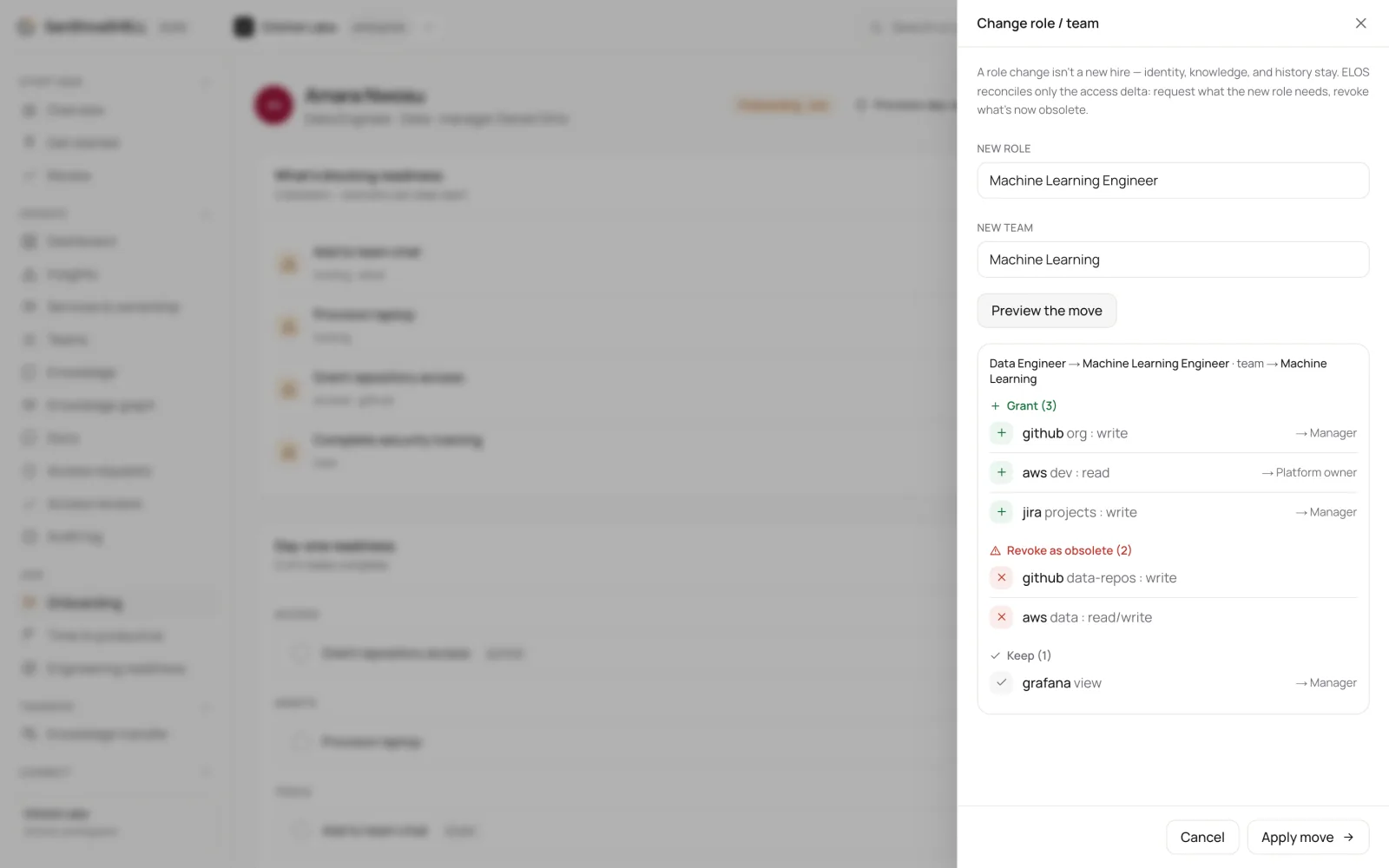
- In Change role / team, enter the New role and, if it changes, the New team.
- Choose Preview the move. ELOS shows the access to Grant, the access to Revoke as obsolete, and the access to Keep, each with the approver it routes to.
- Check the plan, then choose Apply move.
What happens
- New access is requested for the person and routed to its approvers. Nothing is granted without approval.
- Access the new role doesn't need is revoked, so people don't collect access as they move.
- The move is recorded in the audit log with its counts, for example +4 added, -0 revoked, 2 kept.
What's next
- Offboard and hand over: When someone leaves, ELOS revokes their access, releases what they own to a successor, and keeps what they knew.