Set up your organization
For administrators 6 min read
Establish your organization by connecting the tools you already run, in the order engineering onboarding needs. Discovery runs in the background and progress updates live.
Before you begin
- The Manage integrations permission (Platform Admin has it).
- Admin access to your identity provider and source control, to create a least-privilege credential for each.
You set ELOS up by connecting systems, not by filling in forms. Each connection brings in what that system already knows (people, groups, repositories, owners, documents) and keeps it current. Nothing is typed in and nothing is pre-loaded: a new workspace starts empty and fills from your own tools.
Open the Setup flow
- Open Get started in the sidebar. Setup flow is selected.
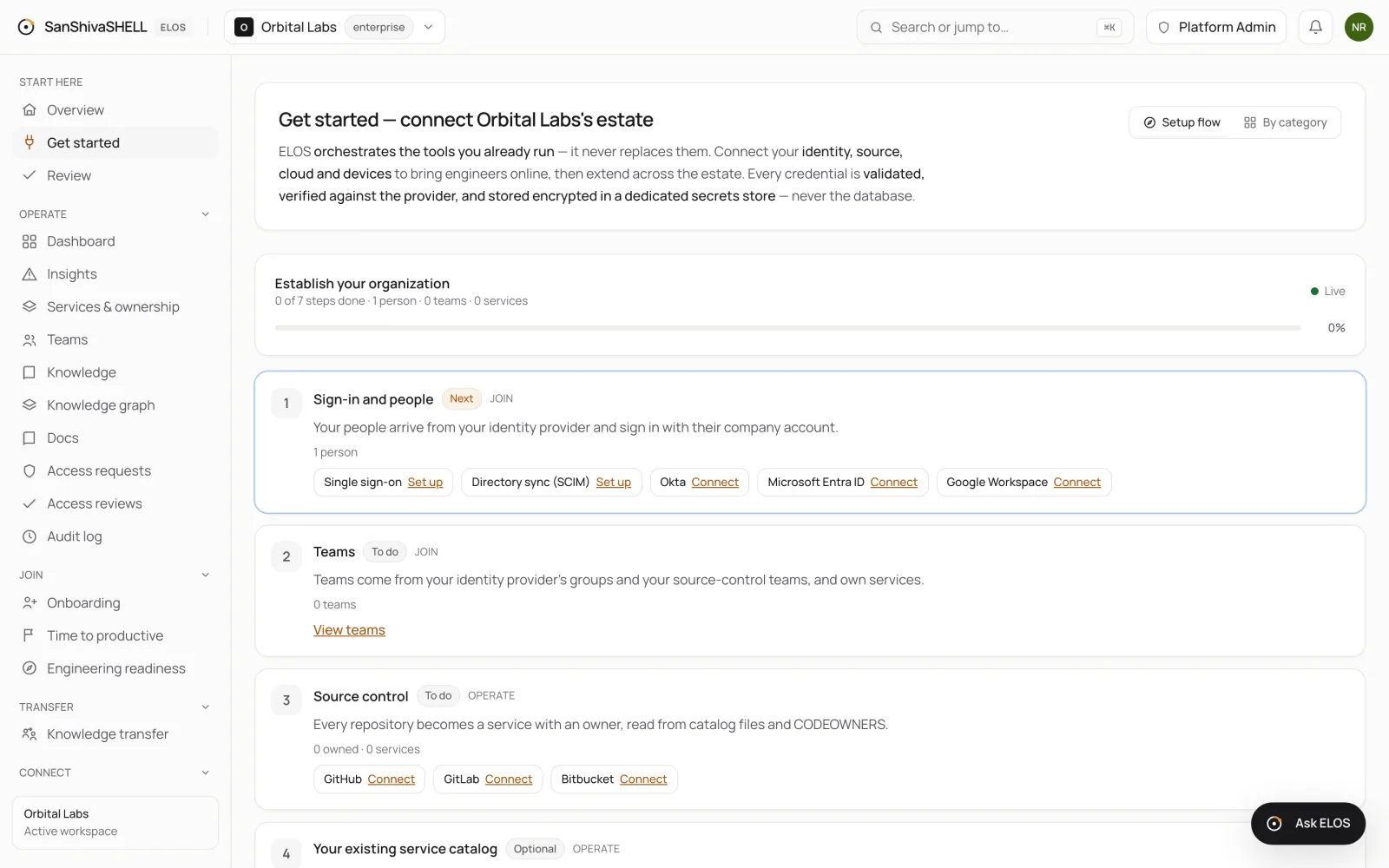
- Establish your organization shows how many steps are done, how many people, teams and services ELOS knows about, and Live while progress is streaming.
- The step marked Next is the one to do now. You can do them in order or jump to any step.
The steps
| Step | What it unlocks | How it's done |
|---|---|---|
| Sign-in and people | Your people arrive from your identity provider and sign in with their company account | Set up single sign-on, and connect directory sync (SCIM) or your identity provider (Okta, Microsoft Entra ID, Google Workspace) |
| Teams | Teams come from your identity provider's groups and your source-control teams, and own services | Done automatically when groups or teams arrive; nothing to enter |
| Source control | Every repository becomes a service with an owner, read from catalog files and CODEOWNERS | Connect GitHub, GitLab or Bitbucket |
| Your existing service catalog (optional) | Bring services, owners, teams and dependencies from the catalog you already run | Connect Backstage. See Bring your Backstage catalog. If you don't run a catalog tool, skip it: an optional step never counts against your progress. Port, Cortex and OpsLevel aren't available yet |
| Runtime and cloud | Cloud accounts, clusters and on-call join the catalog; access is time-bound and least privilege | Connect your cloud accounts and on-call tools, such as AWS, Google Cloud, Azure and PagerDuty |
| Knowledge | Docs and runbooks are linked to the services they describe, read from where they live | Connect Confluence or Notion, or publish docs in ELOS |
| Onboarding essentials | Each engineering team's day-one plan is proposed from its services, people and tools; new members get it automatically | Approve or dismiss each team's proposal. See Onboarding templates |
| Ask ELOS for your organization | Choose what Ask ELOS may use to answer. It answers from your sources and keeps nothing by default | Choose the data domains in Settings |
Watch it happen
When a system connects, ELOS discovers what it holds in the background. You don't need to wait on the page: steps turn Done and the counts update as data arrives, without reloading. If you leave and come back, the flow picks up from where your workspace actually is.
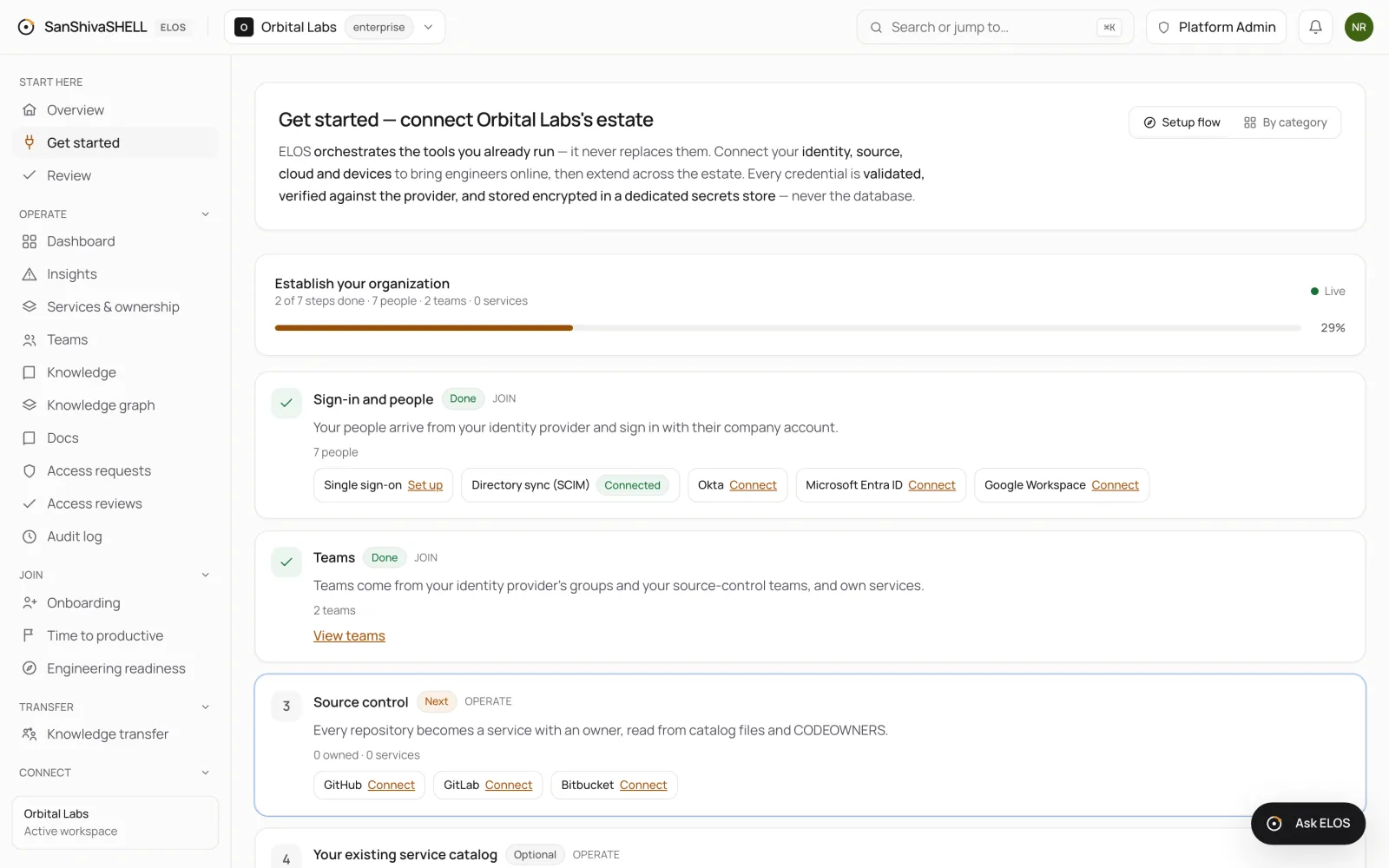
Discovery activity, at the bottom of the page, lists each background run: what it found, anything that needs your review, and any failure with its reason. Use Discover again on a connected system to refresh it now.
Connect a system
Choose Connect next to a system. ELOS asks only for what that system needs, verifies the credential with the provider before saving it, and stores it encrypted in a dedicated secrets store. See Connect your tools.
What's next
- Connect your tools: Connect identity, source control, cloud and other systems. Each credential is verified with the provider before it's trusted.
- Review what your tools disagree on: When your tools disagree about a service, or ELOS matched something only by name, the decision waits in Review. Settle items one at a time or in bulk.
- Members and access roles: See everyone in your workspace, filter by team and status, and bind each member to the access role ELOS enforces.